
Why We Never Touch Bubble.io Before Doing This (And Why You Shouldn't Either)
Feb 8, 2026
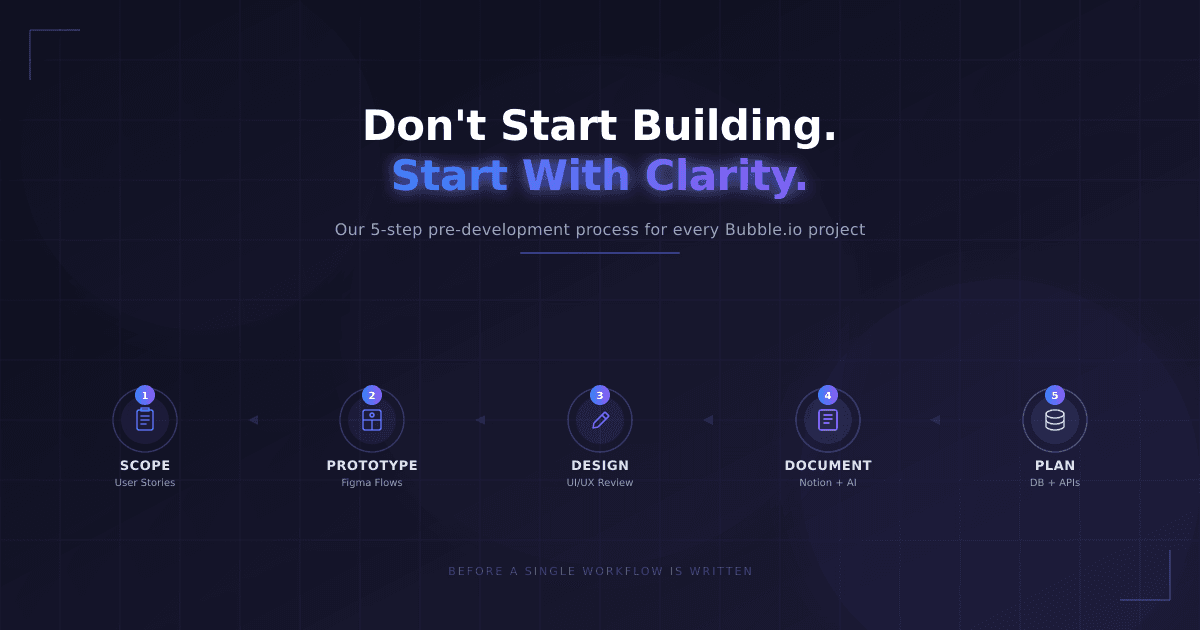
Every client we work with asks the same thing in our first call:
"Can we just start building?"
We get it. You're excited. You've been thinking about this app for weeks — maybe months. You just want to see it come to life. But here's what we've learned after building dozens of apps in Bubble.io: jumping straight into development is the fastest way to burn through your budget and end up with something you don't actually want.
We've seen it happen too many times. A client says "build me a dashboard." We build a dashboard. Then they look at it and say: "That's not what I had in mind." Now we're rebuilding from scratch — on their dime and our time.
That's why we created a structured pre-development process that we run with every single client before we open Bubble. It takes roughly 2 weeks, and it saves months of frustration down the line.
Here's exactly how it works.
Step 1: Scoping Session — Turning Your Idea Into a Blueprint (≈ 3 Hours)
Most clients come to us with an idea. Sometimes it's detailed, sometimes it's a napkin sketch — and both are totally fine. The problem is that ideas live in your head, and what's in your head doesn't always translate clearly into what a developer builds.
So the very first thing we do is sit down with you for a roughly three-hour scoping session. No design. No tech talk. Just you and us, mapping out what your app actually needs to do.
We break everything down into three layers: user stories, pages, and functionalities.
Instead of you telling us "I want a project management tool," we get specific. We write down things like:
As a user, I want to create an account and set up my profile.
As an admin, I want to approve or reject new users.
As a manager, I want to export weekly reports as a PDF.
As a user, I want to see my project history sorted by date.
We go through every single user role — admin, regular user, manager, viewer, whatever your app needs — and we define what each one can do, on which page, and under what conditions.
This is where most clients have their biggest "aha" moment. They realize there are flows they hadn't thought through, edge cases they hadn't considered, and features that sound simple but are actually complex. And that's the whole point: it's a hundred times cheaper to catch these gaps now than after we've already built half the app.
By the end of this session, we have a complete functional blueprint. Not a vague idea — a real, structured document that describes everything the app needs to do.
Step 2: Clickable Prototype in Figma Make(≈ 3 Hours)
Here's something we've learned about clients: most people don't think in user stories — they think in screens. You can nod along to a written spec, but the moment you see the actual pages and click through them, everything changes.
That's why step two is building a clickable prototype in Figma Make. This takes us about three hours and it's one of the most valuable things we do in the entire process.
We're not designing the final look of the app here. We're creating a simple, interactive wireframe that lets you experience the flow. You can click buttons. You can navigate between pages. You can see how a user would actually move through the app from signup to their main tasks.
And every single time, without fail, clients catch things during this phase:
"Wait — this page should come before that one."
"Actually, I don't think I need this feature."
"Oh, I forgot — users also need to be able to do this."
This prototype becomes a shared language between us. Instead of debating abstract ideas over email, we can point at a screen and say "this is what happens when a user clicks here." It removes ambiguity entirely.
Think of it this way: if you were building a house, you wouldn't skip the architectural plans and just start laying bricks. The prototype is our architectural plan.
Step 3: Client Review + Final UI/UX Design in Figma
Once the prototype is ready, we hand it over to you for a proper review. We don't want a quick "looks good." We want structured feedback.
You go through every flow, every page, every interaction and tell us:
Does this flow make sense?
Is anything missing?
Does the layout feel intuitive?
Are there screens that feel unnecessary?
This feedback loop is essential. It's the last checkpoint before we invest serious design hours, and it saves everyone a headache later.
Once you've signed off on the prototype, we bring in our designer. Now we move from wireframes to a polished, production-ready design: colors, typography, spacing, branding, responsive layouts, visual hierarchy — the works.
The key here is that our designer is not guessing. They have the approved prototype, they have the user stories, they know exactly what each screen needs to do. They're designing with complete context, which means fewer revisions and a much better end result.
Step 4: Centralizing Everything in Notion (With AI as Our Knowledge Base)
By this point, we've generated a lot of information: user stories, prototype links, design files, business rules, edge cases, client feedback. If all of that lives in scattered documents and email threads, things start falling through the cracks — fast.
So we centralize everything in Notion. Every piece of project knowledge lives in one place, organized and searchable.
But here's what really makes this work: we use Notion AI as a knowledge assistant for the team. As the project grows, details get complex. Our developer might need to know: "What should happen if a user tries to delete an active project?" Our designer might wonder: "Who has access to the billing page?"
Instead of pinging the project manager on Slack (and waiting for a reply), anyone on the team can ask Notion AI and get an instant answer based on everything we've documented. It dramatically cuts down on miscommunication, wrong assumptions, and those costly "I thought it worked like this" moments.
Notion becomes our single source of truth. If it's not in Notion, it doesn't exist.
Step 5: Technical Planning — Database, APIs, and Time Estimates
Only now — when the what, the why, and the how are crystal clear — do we get into the technical stuff.
This is where we plan:
Database structure: What data does the app store? How are things related? What are the privacy rules?
APIs and external services: Do we need payment processing? Email notifications? Third-party integrations? We map all of it out.
Authentication and permissions: How do users log in? What can each role see and do?
Time estimates: We break every feature into tasks and estimate how long each one takes. We identify what's complex, what's straightforward, what goes into the MVP, and what can wait for a later phase.
This gives you a realistic timeline, a clear scope, and zero surprises. You know exactly what you're getting, when you're getting it, and how much it costs — before we write a single workflow in Bubble.
What Happens If You Skip All This
We've seen it. We've inherited projects from other agencies where none of this was done. Here's what that typically looks like:
The client changes their mind halfway through because they never fully thought it through. Core features were misunderstood because nobody wrote them down properly. The database structure is wrong because nobody planned it. Pages need to be rebuilt. Logic needs to be rewritten. And in the worst cases, the entire project starts over from zero.
That means lost time, higher costs, and a lot of frustration on both sides.
Our pre-development process exists to prevent exactly that. It ensures everyone is aligned, the product is validated, the scope is controlled, and development is smooth.
We Don't Start With Code — We Start With Clarity
Before we write a single workflow in Bubble.io, we make sure we deeply understand three things: what we're building, why we're building it, and how real users will actually use it.
This process typically saves our clients weeks of rework and gives them genuine confidence that the final product will match what they had in mind.
If you're thinking about building an app in Bubble.io — whether it's your first product or your tenth — don't skip this phase. The two weeks you invest upfront will save you months on the other end.
Want to work with us? Get in touch and let's start with a scoping session.